The Power of Fujifilm Colors
The Ramen Chef of Color
I once watched a documentary about a Japanese chef who runs a tiny restaurant on the streets of Tokyo. For decades, he has cooked just one dish: a specific bowl of ramen. Obsessed with perfection, he prepares it again and again, refining every detail, ultimately creating what might be the best ramen on the planet.
In my opinion, Fujifilm approaches color in exactly the same way.
Here are a few examples on what I mean.
The Color Heritage
Until very recently—and perhaps still today, if he hasn’t yet retired—Fujifilm employed a true master who has spent over 50 years crafting and perfecting color. Having begun his career developing Fujifilm’s original film stocks, he later became the visionary responsible for translating that analog soul into the digital film simulations we use today.
His name is Minami-san, and his story is one of lifelong dedication to colors. We told his story here.
There is something deeply reassuring in knowing that the colors coming out of my Fujifilm cameras are shaped by decades of experience, craftsmanship, and dedication.
And this is exactly why Fujifilm’s film simulations aren’t just “cheap filters”—they are a direct continuation of a photographic legacy.
Just marketing talk?
Well, then let’s look at a few practical examples of how this heritage translates into the film simulations we love.
Cheap Filters?
So… film simulations are just cheap filters, right?
Maybe that’s true for brands without Fujifilm’s photographic color heritage. For many camera manufacturers, a “landscape” profile is just a saturation boost, and “black and white” is simply the absence of color.
But for Fujifilm, color is a core pillar of photography—an asset worth immense investment.
Take Nostalgic Negative as an example.
It’s not a random vintage preset, and it’s not even an attempt to copy a single film stock.
Fujifilm’s ambition was much higher: they wanted to recreate the very soul of 1970s color photography — the era of “American New Color”, when photographers were fighting to establish color photography as a serious art form.
To achieve this, Fujifilm didn’t just analyze old negatives. They also studied how film from that era looked when printed on the photographic paper of the time. An entire team was commissioned to research, compare, and distill the essence of an entire movement into a single simulation: Nostalgic Negative.
As part of that process, Fujifilm engineers collected and carefully studied original photobooks by artists such as William Eggleston, Stephen Shore, Joel Sternfeld and Richard Misrach.
That’s how Fujifilm treats color — not as an afterthought, but as a core pillar of photography worth serious investment.
A Small Touch of Brilliance – See With Your Own Eyes
For many brands, black and white is a simple math equation: you just strip the color away. For Fujifilm, it was an opportunity to engineer a masterpiece: ACROS.
One of the most fascinating things about ACROS is that Fujifilm deliberately introduced imperfections.
In a world obsessed with clean, noise-free images, Fujifilm chose to add grain — selectively and intelligently. ACROS uses a sophisticated algorithm that analyzes each image and applies subtle grain structures to certain areas of the image.
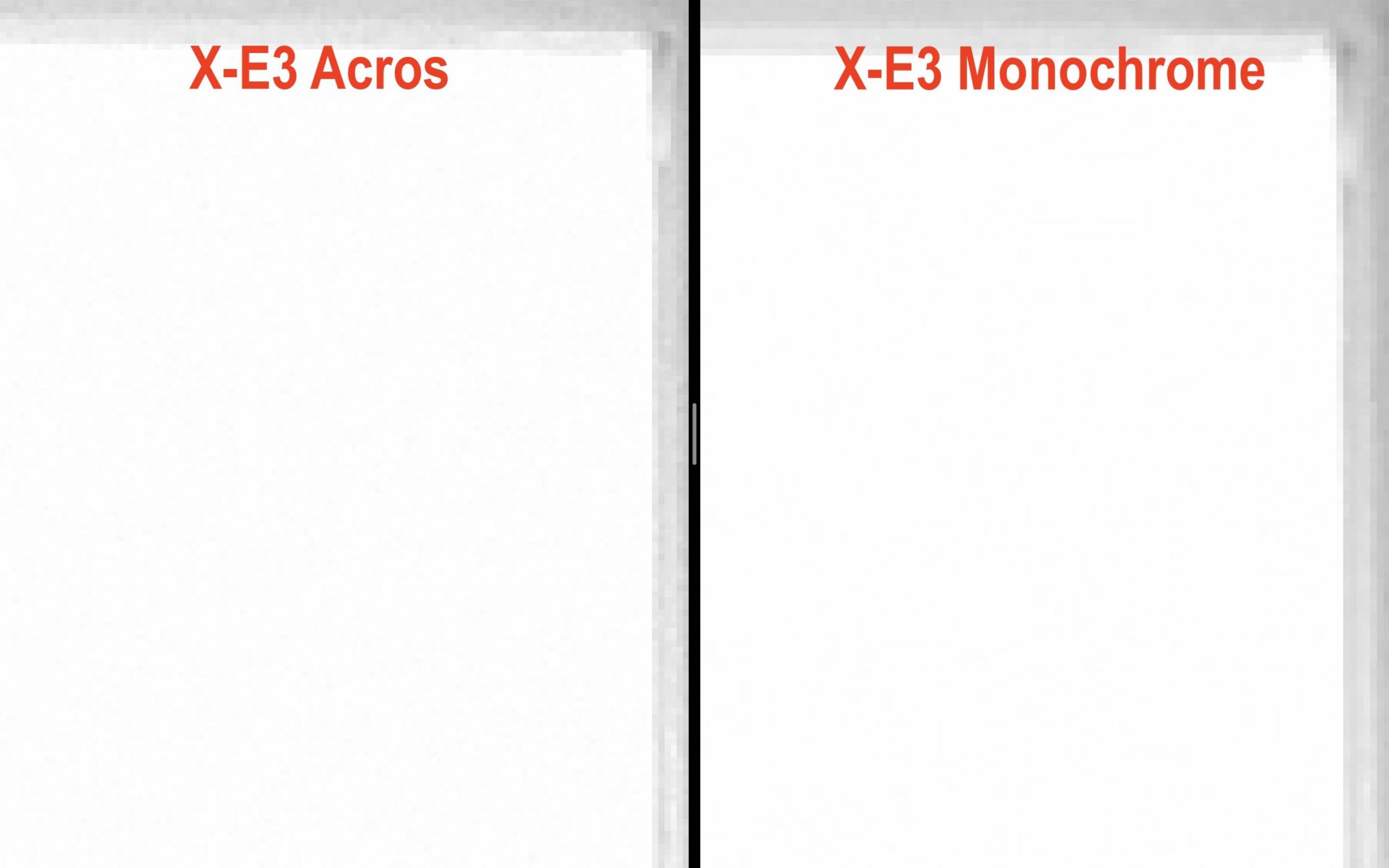
For example, if a part of the image is blown out and pure white, ACROS adds a subtle, film-like grain to that area.
You can see it yourself. Here’s an overexposed image I took with my X-E3. And here’s a crop of the blown-out area. You’ll notice that subtle grain that Acros introduced in the blown out area.
As a comparison, here’s ACROS versus MONOCHROME. Monochrome renders the highlight as flat white. ACROS adds texture and character.
It’s these small touches of brilliance that make Fujifilm film simulations so special.
Obsessive Improvements
When Fujifilm introduces a new film simulation, it’s the result of massive investments in time, money, and research.
But what’s even more impressive is that Fujifilm continues to refine what already exists. We’ve seen this over the years with simulations like Velvia, as shown here.
Color is an obsession at Fujifilm. And like the ramen chef perfecting his single dish over a lifetime, Fujifilm continuously revisits and refines its colors in an endless pursuit of perfection. It is precisely this relentless drive for perfection that pushes Fujifilm to immerse itself completely — almost obsessively — in the world of color.
Simplify Your Life
And what do we get from all this color obsession of Fujifilm?
Well, of course JPEG shooters get nice images out of the box.
But also for hardcore RAW shooters, film simulation can be a serious time-saver, as they dramatically reduce editing time.
I experienced this myself after photographing a friend’s wedding, as I described here. Before Fujifilm, color grading would have taken hours. Now, I simply scroll through film simulations in my editing software, pick the one that works best, and within seconds the colors are done.
You can read more about my editing experience here.
Recipes & Fun
Fujifilm doesn’t stop at great default colors. The ability to fine-tune film simulations directly in camera has created an entire ecosystem of film simulation recipes.
Across the web, you’ll find a wealth of resources dedicated to Fujifilm’s legendary color science and recipes. The most famous is Fuji X Weekly, but there’s also fantastic work at Osan-Bilgi, creator of one of the most beloved recipes ever: Classic Cuban Negative.
And then there is of course our massive 145K-strong Fujifilm Film Simulation group, which showcases the creative power of film simulations and recipes every single day.
All Just Marketing Talk?
At this point, some will say this is all just marketing.
And yes — I get it. I’m biased.
So let me remove myself from the equation.
Let me give the floor to someone who couldn’t care less about Fujifilm: the guy behind SonyAlphaRumors.
Here is the story:
I had just returned from a multi-day hike in the Dolomites when I shared this image on Instagram.
Shortly after, the SAR guy contacted me to congratulate me on the shot and stunned by the colors asked how I edited the colors.
My answer surprised him.
I didn’t edit them at all.
I simply used the Astia film simulation. Zero editing. They colors were “born” this way right inside my Fujifilm camera.
When a die-hard shooter from a rival brand asks for your ‘editing secret’ and the answer is ‘none,’ you know it’s not just marketing—it’s the art in the machine.
Conclusion
Fujifilm colors are not an accident, and they are not a gimmick. They are the result of decades of experience, cultural heritage, and an almost obsessive attention to detail.
You don’t have to love them. You don’t even have to use them. But once you understand how much thought, research, and craftsmanship goes into them, it becomes clear that Fujifilm film simulations are something very different from “just filters.”
They are Fujifilm’s way of embedding photographic history directly into the shooting experience — and for many photographers, that makes all the difference.
The Danger Zone