Nikon F mount to Fujifilm X mount Smart AF Adapter New Features and Coming Soon
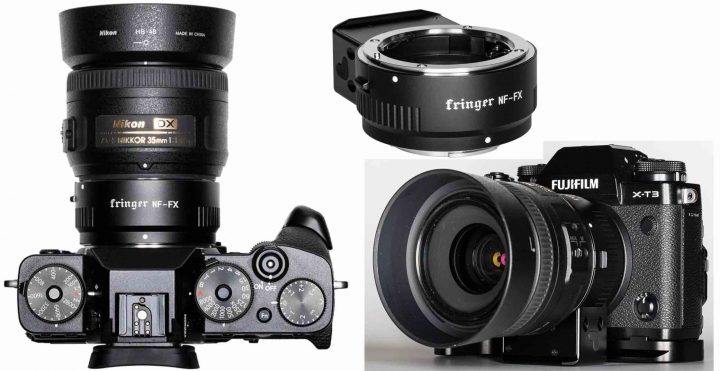
Fringer Nikon F to Fujifilm X Smar AF Adapter

Press Release

New feature of Fringer NF-FX adapter: LaCA correction

Fringer NF-FX (Nikon F mount to Fujifilm X mount) smart adapter will be released soon. Today we’d like to introduce an interesting feature of the adapter, i.e. LaCA correction.

LaCA, stands for lateral chromatic aberration, is resulting from a difference of image scale at different wavelength of red, green and blue light. LaCA causes colored fringes at high contrast edges of the image.

When we shoot RAW, LaCA can be easily removed by post processing. However, a key feature of Fujifilm cameras is their film simulation. In other words, we usually use the jpeg files directly out of the camera with few post processing. When using native X mount lenses, there is no problem since Fujifilm cameras will correct all the LaCA automatically. But when using adapted lenses, LaCA become a problem.

Fringer NF-FX has a built-in LaCA correction profile data base for all the lenses that have been tested and optimized (see this list). When shooting jpegs, the adapter will provide the LaCA correction profile of current lens to the camera automatically. The latter will use that profile to correct LaCA when generating jpeg pictures. Finally, user get a jpeg photo directly out of the camera which is LaCA free.

Please see the following example.

** CLICK HERE to Read the Rest of the Article **

Fuji Guys Explain Fujifilm Camera Remote App and How to Fix Connection Issues (Sort of)


Fujifilm Camera Remote App

The Fuji Guys published a short video, where they talk about the Fujifilm camera remote App.

They say this video is for those, who download the App for the first time or if you are having any troubles with the App itself.

The issues can happen for example if you updated your smartphone.

In this case, the Fuji Guys recommend to delete the App as well as to delete the pairing registration in your camera menu connection settings.

Then download the Fujifilm Camera Remote App again and pair camera and smartphone again.

When you try to transfer images on your phone, the camera might ask you to start up the Fujifilm camera remote App. If the camera does not connect to the smartphone, click “Change – OK” on the camera.

Why this? Francis says:

because if you use the camera on your iPad and on your iPhone, you need to change the registration for which device is going to be using

Done that, click on “join name of your camera  wifi network” and wait for the camera and phone to connect.

In my experience this works sometimes to get things going, but not always. Sometimes I can try whatever I want, and it does not connect. Usually I fix it by getting a beer, waiting a while, and try again. Sometimes that works!

Anyway, thanks Fujifilm, we appreciate the effort in explaining the issue. But do you want to do really something cool? Well, then check out the Panasonic camera remote App and copy that one 1:1.

Lots of things make me happy in the Fuji world… the App is not one of them.

Join Our Owners Groups

Join Our Facebook Pages

Notice of Fujifilm Application Software Used with macOS 11.0.1 “Big Sur” – UPDATED

Fujifilm has released an update regarding the issues with macOS Big Sur support:

December 10, 2020 updated

Compatibility with macOS 11.0 Big Sur is added to the application software below. Download them from the website and install them.

November 25, 2020 updated

FUJIFILM Pixel Shift Combiner (Ver.1.0.0) is added to the applicable application software above. Compatibility with macOS 11.0 Big Sur is added to the application software below. Download them from the website and install them.

  • The application software below compatible with macOS 11.0 Big Sur have been disclosed on the Adobe website.
  • Tether Shooting Plug-in PRO for Adobe® Photoshop® Lightroom®
  • Tether Shooting Plug-in for Adobe® Photoshop®Lightroom®
  • Tether Shooting Plug-in PRO for GFX

macOS is a registered trademark of Apple Inc.

Follow FujiRumors on Patreon, Facebook, Instagram, RSS-feed, Youtube, Flipboard and Twitter

Join Our Owners Groups

Join Our Facebook Pages

via fujifilm

Top Fujifilm Product 2020 – VOTE NOW

Top Fujifilm Product 2020

There won’t be any more announcements in 2020, so time to look back at the Fujifilm year 2020 and vote which one according to you was the top product of the year launched by Fujifilm.

You find the survey down below.

Join Our Owners Groups

Join Our Facebook Pages

Top Fujifilm Product of 2020

View Results

Loading ... Loading ...

The Rise of Selfie Screens, The Myth of Them Being Better for Video and About Pleasing Youtubers instead of Customers

2020 Trend

These days everybody is making its list of the best and worst gear 2020, as well as best and worst trends of 2020.

And it’s on the latter one, the “trends”, that I would like to focus on today.

Because it is clear: one of the hot trends in the photography industry is putting selfie screens on cameras.

And guys, we have to talk about it!

I Am NOT a Selfie Screen Hater

To be clear: I do not hate selfie screens.

And in fact, during the various COVID-19 lockdowns, I often have to teach online and record my lessons, and the selfie screen is a true blessing!

A fully articulating screen is not the photography-evil of our times. It still works fine, it’s still flexible, and I have rather rapidly learned to accept it on my Fujifilm X-T4, sometimes even to love it (especially during my online lessons).

So, if you are one of those, who loves the fully articulating screen, I get it. Maybe I don’t love it as much as you do, but I could totally accept a selfie screen on cameras like the future Fujifilm X-H2 for example.

But….

But it’s getting a bit out of control, with selfie screens just popping up on so many cameras, that we have to talk about it.

And why is this happening?

Tony Northrup
“Selfie Screen? Pleasing Youtubers is Higher Priority than Pleasing Customers”

Vs.
Jonas Rask
“I have no count as to how many shots I missed becauseof the Selfie Screen”

** CLICK HERE to Read the Rest of the Article **