Fujifilm Financial Results Q3 2025: Imaging Business Keeps Booming – Profit Forecast Revised Upward
Fujifilm has published the financial results for the third quarter of the 2025 fiscal year (the fiscal year 2025 ends in March 31, 2026).
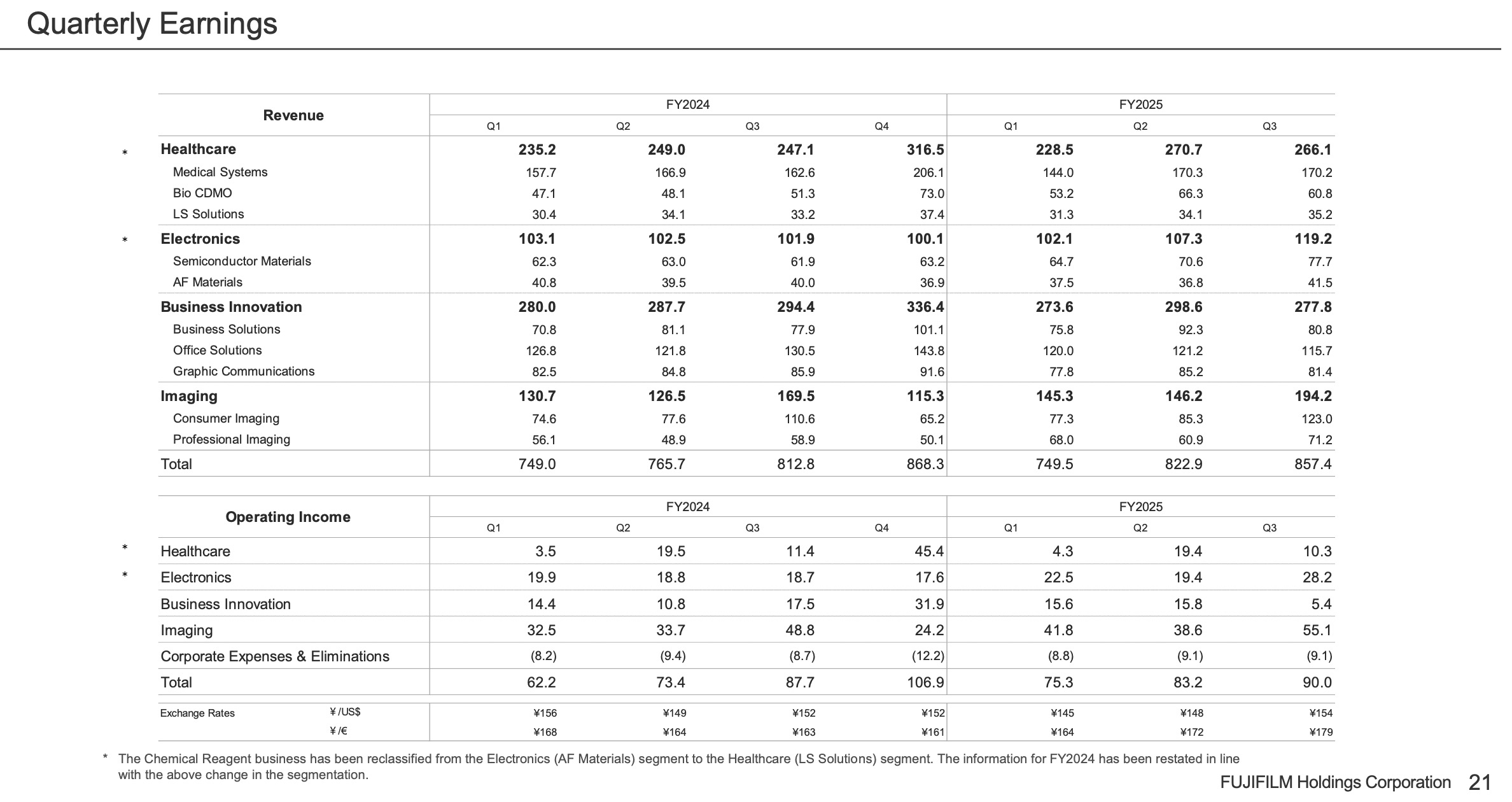
It’s a very positive financial result for the imaging division, with the professional imaging generating in every quarter more revenue in 2025 than it did in the quarters of 2024.
Overall
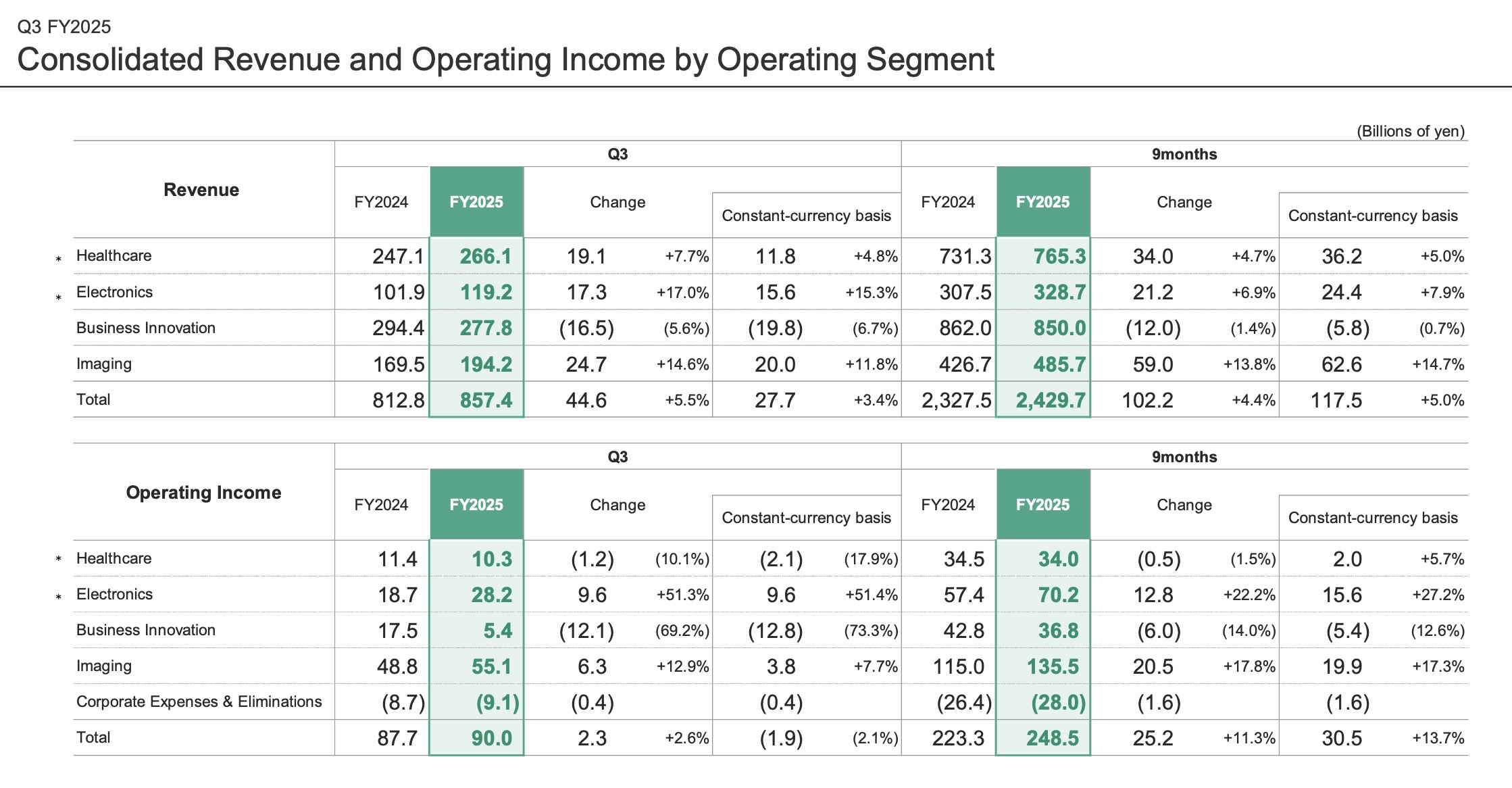
In the nine months of the fiscal year ending March 2026, revenue increased by 4.4% year-over-year to JPY2,429.7 billion, driven by strong sales in the Healthcare, Electronics, and Imaging businesses, which offset the negative impact of exchange rates. Operating income increased by 11.3% year-over-year to JPY248.5 billion, despite impacts of U.S. tariff policy and rising raw material costs, supported by higher gross profit associated with revenue growth. Net income attributable to FUJIFILM Holdings increased by 6.5% year-over-year to JPY193.4 billion.
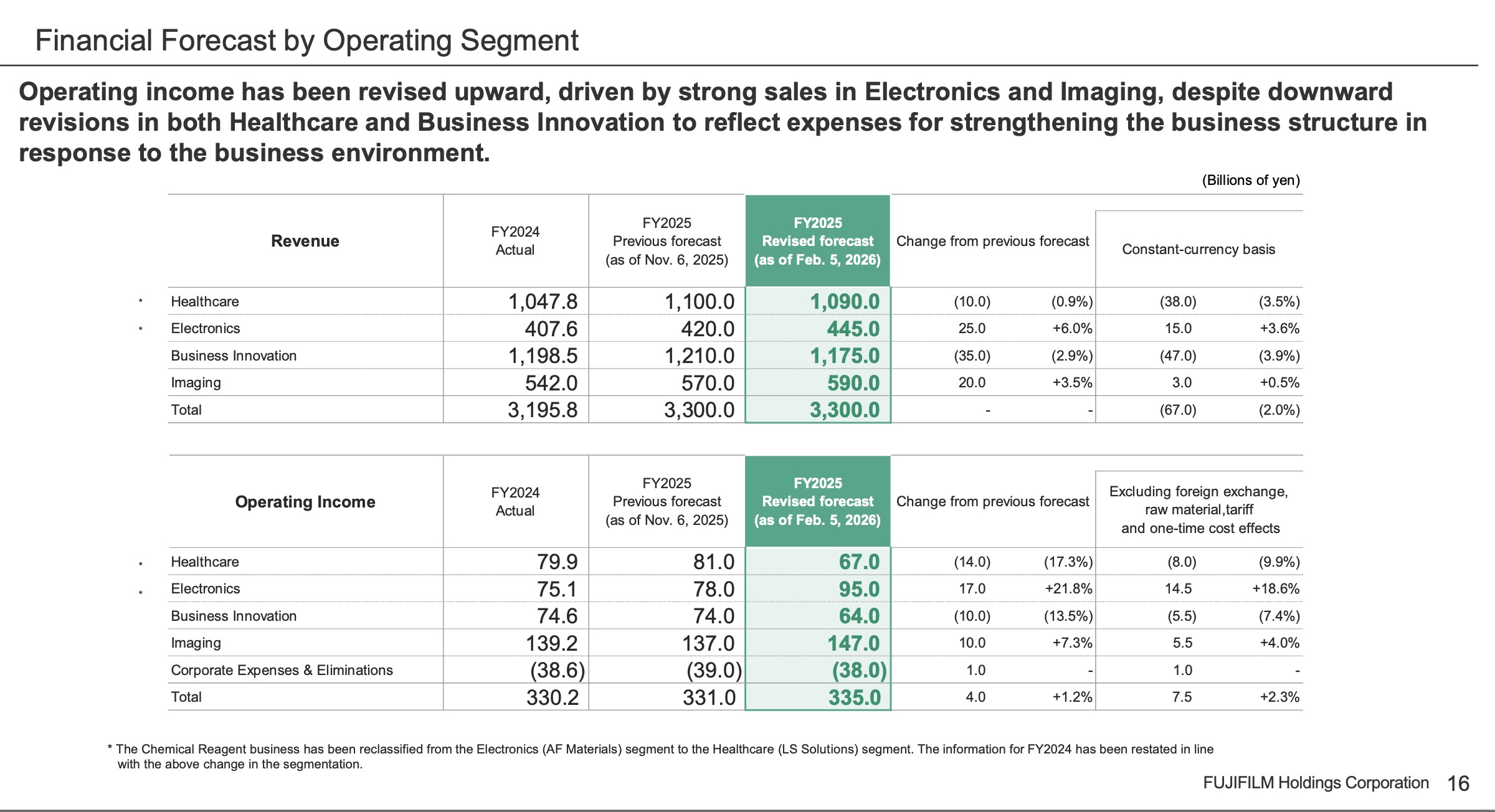
Reflecting the strong performance of the Electronics and Imaging businesses, the company has revised its full-year consolidated forecast for the fiscal year ending March 2026 upward, increasing operating income by JPY4.0 billion, and net income attributable to FUJIFILM Holdings by JPY2.5 billion.
[CEO Teiichi Goto says] ““We will maintain this strong growth momentum and aim to achieve record high revenue and profits for the full fiscal year ending March 2026”
Imaging
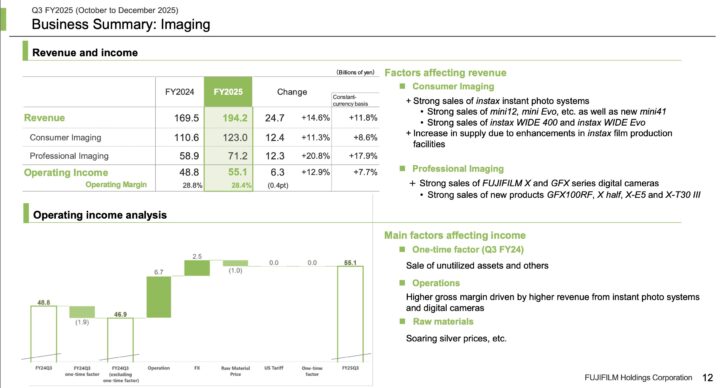
- Strong demand for instant photo systems and digital cameras drove revenue by 14.6% year-over-year to JPY194.2 billion, and operating income increased by 12.9% year-over-year to JPY55.1 billion.
- In the Consumer Imaging business, consistent demand for instax™ instant photo systems contributed to higher revenue.
- In the Professional Imaging business, revenue growth was supported by the strong performance of the X Series and GFX Series cameras.
Factors affecting revenue
- Consumer Imaging
+ Strong sales of instax instant photo systems
• Strong sales of mini12, mini Evo, etc. as well as new mini41
• Strong sales of instax WIDE 400 and instax WIDE Evo
+ Increase in supply due to enhancements in instax film production facilities - Professional Imaging
+ Strong sales of FUJIFILM X and GFX series digital cameras
• Strong sales of new products GFX100RF, X half, X-E5 and X-T30 III
Imaging Summary
The Imaging segment, consolidated revenue amounted to ¥485.7 billion (up 13.8% year-over-year).
Operating income amounted to ¥135.5 billion (up 17.8% year-over-year).
The consumer imaging business posted higher revenue, as sales of the instax instant photo systems continued to expand, surpassing cumulative sales of 100 million units. A wide variety of models popular among a broad range of users continue to have a solid growth in sales, including the mainstay models instax mini 12 and instax mini Evo, along with models launched last fiscal year, such as instax WIDE 400, instax Link 3 and instax WIDE Evo. We are also continuing to acquire new users by launching the entry-level instax mini 41 with a classic design in April 2025, and instax mini LiPlay+, which comes with an advanced version of a feature that combines sound and still images in November 2025. Additionally, in December 2025, we announced our plan to expand the production facilities of instax films to meet growing global demand. We will continue to expand the world of instax, enabling people to enjoy instant photo printing and further enhancing the value and joy of photography.
In the professional imaging business, expanded sales of digital cameras contributed to higher revenue. In addition to solid sales of models launched in the previous fiscal year, the growth was driven by new products, such as FUJIFILM GFX100RF, FUJIFILM X-HF1 (“X half”) and FUJIFILM X-E5. In October 2025, we launched the FUJIFILM GFX ETERNA 55 cinema camera, and in November 2025, the FUJIFILM X-T30 III mirrorless digital camera. We will continue to provide attractive products for digital camera users and the film industry by expanding our range of offerings, from the outstanding image quality with large format sensors in the GFX series and the best balance of image quality and size in the X series, to such new concept cameras as the FUJIFILM GFX100RF and X half.