The “Leica-Killer” Fuji X-Pro2: “Nearly the FIRST EVER ergonomically Perfect Camera, Except For…”? – With POLL

Share

“Leica-Killer” X-Pro2… the Almost Perfect Camera

eoshd is very pleased by the stills & video performance of the X-Pro2. He really loves it and says that he has “never enjoyed a camera more on a combined video and stills shoot than I have the X Pro2.

Great images, great shooting experience, logical control layout & great menu. He calls it even a “Leica-Killer”,  because it’s cheaper, lighter, faster “but just as nice to shoot with as the legendary rangefinder in terms of feel and optics. It’s even pretty close for build quality considering the gap, no, gulf in price.”

But we have already read so many good things about the X-Pro2, so let’s focus on the biggest complaints this time.

  1. “4K: The inglorious own goal however is that even though by their own admission the Fuji X Pro2 is fully equipped for 4K video, Fuji admit that due to ‘only’ 20% of their users wanting it, they have disabled it in firmware. UTTER stupidity. 20%!! Why potentially flush even 0.01% of your sales down the toilet for the sake of firmware? Are they seriously expecting ALL video users to get the X-T2 instead? Why not let us have the choice of body? […] If they don’t re-enable 4K in firmware on this camera and reserve it as an X-T2-only feature, they’re making an enormous mistake.”
  2. The X Pro2 is nearly the FIRST EVER perfect digital camera ergonomically for photography, but for one disturbing blunder… The combined shutter and ISO dial is horrendous!”

The ISO Dial

Ok, so let’s talk about the ISO dial… loved by some, hated by others.

As you can read at fujifilm-x, Fujifilm decided to go for the ISO-dial because it looks so retro and it’s practical:

the practical operation is about being able to manipulate the 4 elements [ISO, Shutter Speed, Aperture, Exposure] with precision. […] when the X-T1, a camera that had a dedicated ISO dial, was announced, then people quickly realized the significance. We started getting request to “Add the ISO dial to the next X-Pro model!”

Fujifilm tested different dials. At the end they went for the ISO/Shutter combined dial, a technically rather complicated solution.

Why do we spend so much time on this one dial? Unfortunately there is no economic and rational answer to that question. But it was something that the developing team of X-Pro camera had always dreamed of achieving. And it was also something that the passionate X-Pro users strongly wished for.”

But it’s exactly this dial, that eoshd calls “horrendous“. From what I could read so far, some love the dial, other find it cool but not practical, while other would prefer not to have it at all. So I thought it’s time for a Poll.

When developing the X-Pro2, Fujifilm considered at least 3 ISO-dial options: the “Shutter/ISO” combination, the “Sub LCD” ISO dial and the “Exposure & ISO” dial. I’ll share a pic of each solution down below (via fujifilm-x). Check them out and then Vote your favorite option:

My Favorite ISO-Dial Solution is...

View Results

Loading ... Loading ...

Fujifilm X-Pro2: USA: BHphoto / AmazonUS / FocusCamera / Adorama / Pictureline / BestBuy  CANADA: AmazonCA / EUROPE: AmazonDE / AmazonUK / WexUK / PCHstore / AmazonITA / AmazonFR / AmazonESP /   AUSTRALIA: CameraPro

SUB-LCD ISO DIAL

_ _ _

EXPOSURE / ISO DIAL

_ _ _

SHUTTER/ISO DIAL

Share

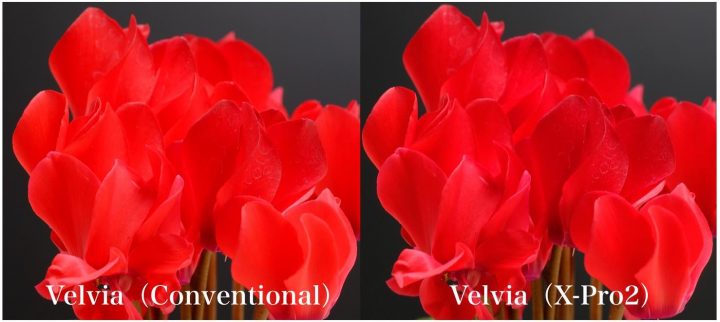
Fuji Vs. Fuji :: The Film Simulation (R)-Evolution :: All FS Improved :: See Conventional Velvia Vs. X-Pro2 Velvia!

Share

The New Film Simulation ACROS, introduced with the Fuji X-Pro2, was a full success. Photographers love it and some call it even “a game changer”. But that’s not all.

As we know since this Fuji Manager interview here, Fujifilm also tweaked all the other film simulations. The capabilities of the new X-Pro2 sensor/processor combo allowed Fuji to evolve and improve every film simulation, and in particular Velvia, as you can see from the sample shared above.

Here is the more technical explanation:

That vivid Velvia color is still maintained, but the change in color is more expressive with the new algorithm. You can say that it has more “depth”.

The image designing and its algorithm for the X-Pro2 use a new method for converting the raw signals. To create an image, it picks up signals that were not previously picked up. The camera got “better” at extracting information from the raw signals.  So as a result, it can express more detail without supersaturation. It extracts only the needed elements for the “human eye” and “photograph” so it doesn’t affect the image quality.

But we need to balance out the image processing and the processor capability. We wanted to do the same processing for X-T1 and X-Pro1, but the algorithm was too complex that the previous processor was not powerful enough. We could not implement the image processing up until now.

Maybe we could have installed it. But that would be with the compromise on the unrealistic processing time. You would have to wait several seconds before you can take another. Another compromise would be that the images are no longer “What you see is what you get”. Either way, we would not allow such camera.

You can read more about it at fujifilm-x

Share

The Fujifilm X-Pro2 Sucks… a lot of Battery Power :-) :: This Accessory Allows you to Charge Quickly Multiple Batteries!

Share

battery

– – – X-Pro2 Bug-Fix Firmware ver. 1.01 is out – – –

Reviewers said it pretty clearly so far: the Fujifilm X-Pro2 does not really shine when it comes to battery life (nor do other X-series cameras). It’s a minor issue for me, since spare batteries are small, cheap, and some are really good (read the article about the Best Third Party Fuji Batteries).

However, the more batteries you own & use, the more you have to charge when you come back home (or at the hotel) after a long day of shooting… batteries that you need fully charged again the next day.

FR-reader Willy (thanks!) just dropped me an email with a link to a simple solution: a dual battery charger, which allows you to charge 2 batteries simultaneously using one single socket wall.

Maybe many of you already own one, but for those who (like me) somehow missed this accessory, it might be worth to consider to grab one.

In USA you can get the Watson dual battery charger at BHphoto and AmazonUS. The charger also has a USB 2.0 Port for Charging Other Devices. On Adorama you can find the Green Extreme Dual Smart Charger.

For Canada check out AmazonCA.

I’ve looked for the charger in EU, and I’ve found the Patona Dual USB charger at AmazonDE. For the Watson Duo equivalent version check out AmazonDE here. You can find the dual chargers also at AmazonUK, AmazonITA, AmazonFRA, AmazonESP.

Look worldwide for [shoplink 44057 ebay]Watson/Patona dual Chargers on eBay[/shoplink].

Share

Save $550 on the XF 50-140mm + 1.4 TC bundle! – New Item, Full USA Warranty, Official Fuji Seller

Share

tzui

Top Rated and authorized Fuji seller [shoplink 44068 ebay]kenmorecamera[/shoplink] has the XF50-140 + 1.4TC bundle (NEW) available [shoplink 44068 ebay]for just $1,499[/shoplink]. That’s a $550 price drop compared to the original price. The same bundle is in offer at the current US-X deals for $1,699 ($350 off).

US-X DEALS EXPIRE APRIL 2

Fujifilm X-Pro2 + 35mmF2 WR (save $100): BHphotoAmazonUS /Adorama /

XF LENSES

XF 56mm APD (save $400): BHphoto / AmazonUSFocusCamera / Adorama

XF 90mmF2 WR (save $200): BHphoto / AmazonUSFocusCamera / Adorama
XF 10-24mm (save $200): BHphoto / AmazonUSFocusCamera / Adorama
XF 16mmF1.4 WR (save $200): BHphoto / AmazonUS / Adorama

Share
** CLICK HERE to Read the Rest of the Article **