It’s a fact: the Fujifilm X-T5 is totally unsuitable for wildlife photography!
It features a non-professional APS-C sensor giving you unflexible files that are a pain to work with in Lightroom, its autofocus can’t track anything that moves faster than a snail, and we’ve even heard reports of lions refusing to pose the moment they spot a Fujifilm camera.
And if that wasn’t enough, imagine using two utterly ridiculous lenses for wildlife: the painfully slow Fujinon XF70-300mmF4-5.6 (made even slower with the 1.4x teleconverter), and the totally unusable Fujinon XF16-80mmF4 — a lens that proudly showcases every flaw a lens can possibly have.
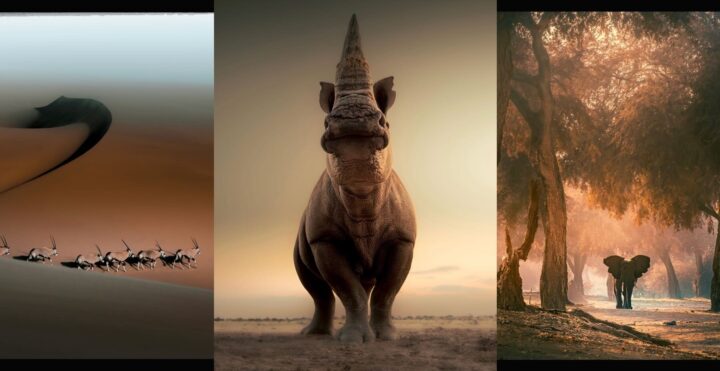
Now imagine heading out on safari with such a setup. You can already picture the horrors: lions barely recognizable behind suffocating X-Trans grain, birds smeared into abstract brushstrokes like a painter who quit halfway, and images simultaneously swallowed by shadows and scorched by blown-out highlights.
And look, guys — this isn’t just a tale. It’s reality…
and I can prove it!
If you’re brave enough — if you’re ready to swallow the red pill of truth — then scroll down and see the images.
But be warned: what you’re about to witness cannot be unseen. You may find yourself throwing all your worthless Fujifilm gear out of your window.
Just… before you do that, please send me your mailing address.
I’ll be waiting outside. 😉
The images were shared by Solly Levi in our Fujifilm X-T group. As far as I know, after publishing them he was permanently banned from every wildlife reserve in Africa — apparently his photos are so bad they’re considered harmful to the safari industry.
Author’s Note 1: No Fujifilm cameras were harmed in the making of this article — only a few readers who skipped straight to the comments, missed the irony entirely, and will inevitably call the piece “defensive.” We’re not defending any gear; we’re simply mocking, in deliberately exaggerated fashion, the usual criticisms that are often rooted more in fanboyism than in actual, well-argued experience.
Author’s Note 2: The previous note is probably pointless anyway. People who’ll feel offended by this article won’t read past the headline in the first place.
Author’s Note 3: Why are you still reading this? Go enjoy the images below!
Author’s Note 4: Still here? I wish you’d read your camera manual with the same care you are reading these notes.
Fujifilm Gear You Should NEVER Buy:
The Gallery of Horrors